Friday, April 29, 2005

Google Hacking


I got the book couple of weeks ago and almost finished reading it.
I'm not a good book reviewer, so I can say only one thing:
just buy this book!
If you think you have known enough about google, just because you have been using it for years, read the book and think again.
Still not convinced? Go to the author site and check the forum.
Hope you are scared enough just like I am ;)

Sunday, April 17, 2005

Mac Mini is Not Mini

Yes!
After waiting for couple of months, finally I got my Mac Mini!
The configuration is 1.42 GHz, 80 GB harddrive, combo CD-RW/DVD, airport extreme and bluetooth. All together comes with around $870.
I know it's more expensive than the list price in Apple site, but hei, I don't live in US!

First impression: the box is so cute.
It looks really small in the picture, and it is really small.
The size is almost the same with my first external CD writer.

Switched it on, Apple logo appears, spent some time to fill the registration and username, and get fully functional OS X panther.
Performance: acceptable. It's definitely not mini.
I didn't upgrade the memory so it's still 256 MB. But it's enough for home user applications.
The best part from Mac Mini: it's so cute and very quite.

The first thing I did, obviously, was installing Firefox.
Then enabled SSH, Apple file sharing, firewall, and started transferring my music collection to it.
The purpose is clear: to make it as entertainment center.

Unfortunately my kid and my wife love it too and decided not to allow me to do funny staff on it.
My Mac Mini now is under their custody.
Well, I have to wait until they get bored.
But at least I'm glad they don't have to deal with Window$ ever again.

Thank you Steve Jobs, to make all of this possible.

Wednesday, March 30, 2005

Stuck in a Moment

Busy, busy, busy.
What a lame excuse.
But I don't have a better excuse for not updating my blog.
My new boss is here, so I have to work a bit harder to show him my existence.
I have been busy with some network and security monitoring stuff.
Don't worry, they will be published here once they are ready.

And other thing that cursed my time is my wireless course.
I conducted wireless network crash course last week called:
The Invisible Network Revealed.
The title is cool, but the course was not that cool.
I had a problem with both my Powerbook and IBM T42.
They betrayed me during the d-day.
My powerbook refused to connect to the Infocus projector.
And my IBM T42 self-destructed its hard drive when I tried to connect it to the same projector.
I did the course eventually even I felt that it was awful.

Anyway, busy time doesn't always mean no fun.
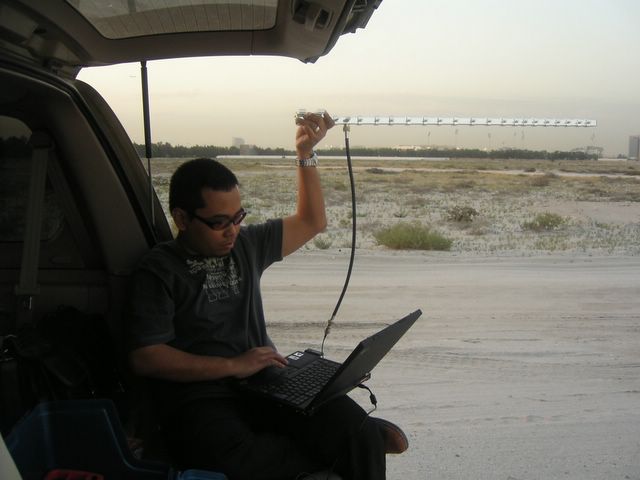
I was having a good time in the middle of desert, watching the RF signal flies:


The power of 20 dBi Yagi antenna is in my hand!

I have so many things to upload to this site.
But I believe it's gonna take a while.
Keep in touch.

Friday, February 25, 2005

WRT54G Story Continues

Yesterday I bought another WRT54G from local store. After heavy bargaining and bluffing, I got it for $78. Now that I have 2 WRTs, I can put one at home for normal AP and one inside my car for “anything else”. Nice plan, huh?

From the outside box, there is no different between the new WRT and the one that I purchased couple of months ago. But after I removed it out from the box and read the version number on the back, it’s written “WRT54G v2.2”. My first WRT is v2.0.
I checked the box again and there is nothing at all that can give me a clue about the version of the device inside. Only I notice WRT54G v2.2 has serial number started from CDF7xxx while v2.0 has serial number CDF5xxx. But I’m not 100% sure.

Anyway, from our best friend Google I found out that there are currently 4 versions of WRT54G in the market:
v1.0, v1.1, v2.0 and v2.2.
Read the nice presentation from Neal Dudley here. It contains the pictures of all versions of WRT54G from external and internal view.

According to Simon in Linksysinfo forum, until now only the latest HyperWRT firmware and official firmware from Linksys can be used to flash v2.2. From somewhere I read that v2.2 actually uses the same Broadcom chipset, but now the LAN ports controller is part of the chipset.
Quick check from cpuinfo output confirms that both 2.0 and 2.2 versions are using the same chipset:
(none):[~]# cat /proc/cpuinfo
system type : Broadcom BCM947XX
processor : 0
cpu model : BCM3302 V0.7
BogoMIPS : 199.47

So now I’m stuck with WRT54G v2.2 and I can’t use my favorite Sveasoft Satori to flash the router. Should I use the new WRT as normal AP and the previous 2.0 as my mobile scanner? Well, I don’t like to spend 78 bucks only to get normal AP, so I downloaded the latest HyperWRT firmware and upgraded my new router.
Everything looks good. Now I have the option to increase the transmit power to 84 mW and I like the idea to put “reboot” button on the web interface. However, SSH is not available by default, only telnet. The good thing about HyperWRT is it has an option to modify the startup script. I put telnet command and “route add default gw 10.1.1.1” in startup script to make sure both will be available even I reboot the router. I don’t understand why there is no option to put default gateway for LAN interface on the web interface, even though I can achieve the same thing by putting the mentioned route command in startup script.

How about Kismet? Well, since there is no SSH, I have to run wget to get the kismet drone binary and config files. It consumes more effort since now I have to setup a web server with all the files. Sure it’s a linux system, honey. So I should be able to install any packages, right? The problem is the file system of HyperWRT is mounted as read only. We can write new files in /tmp directory only. And as you may guest, all these new files will go away once we reboot the router.

So I decide to try with “unofficial” Sveasoft Alchemy firmware which can be downloaded from freeWRT site. Hey listen, I don’t mind to pay $20 annually but I can’t pay with Paypal. I have sent Sveasoft support an email and requested to let me pay through other way.

The reason why I love Sveasoft software is because they build feature-rich firmware. I’m using Alchemy 6 Mod v16 and I can see there is an option to mount SMB file system. I haven’t tried to mount any drives yet but I believe it rocks!!!

How about the performance? I see that I can boost the power to 251 mW. Hmm, doesn’t it sound so tendentious?
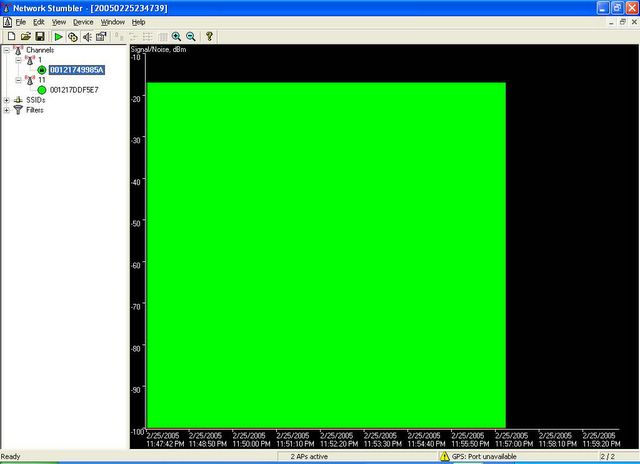
So I run netstumbler to verify. I put one Linksys in Channel 1 and the other in Channel 11. WRT54G v2.0 running Satori is on channel 1 with 28 mW Xmit power and the result can be seen below:


As we can see, the performance is constant in one point. Then I compare with WRT54G v2.2 running Alchemy on channel 11 with maximum 251 mW:


Well, the picture has spoken. The performance of Alchemy is not as stable as Satori. And even when I use WRT v2.2 Alchemy as normal AP, my laptop got disconnected several times.

I need to run more test to double check. But I believe I have already made my mind: Satori will stay at home and Alchemy will get the honour to be in my car. Unless it’s proven that I can’t use Alchemy to even run stable Kismet off course.

Is it true that we can use only HyperWRT and Sveasoft Alchemy for WRT54G v2.2? Some people say even you don’t turn the router into blue colored brick, there is a chance to lose the LAN ports if the firmware we use is not compatible with the new LAN controller chipset. Then you can re-flash the firmware only from the wireless network.

I would like to try it by myself, but not tonight.
OpenBSD Layer 2 bridging firewall has been waiting.
If you like to read the e-mail from Sveasoft to Google regarding the copyright violation by FreeWRT site, please check out this link. For me, I prefer to subscribe and get the firmware officially.
The decision is yours.

Wednesday, February 23, 2005

Kismet on WRT54G the Easiest Way

Linksys WRT54G is awesome.
It's an ADSL wireless router with linux-based software inside, licensed under GPL.
The price is reasonable, Amazon sells it for $60. I got mine from local store for about $80. The only drawback with WRT is it's not compatible with ADSL service offered by the only ISP in this country, Etisalat. But you know what? It means your chance to bargain the price is even better!
The most interesting feature from WRT is you can replace the software with third party firmware. Hey, it means we void the warranty! This is acceptable in the world where the only way to find the truth is by hacking. Suck the knowledge by testing and trying. Fill the brain with the answers of uncertainty.

Anyway, today we are going to make Linksys WRT54G as wireless IDS. This ADSL router will become the sensor or drone for famous wireless tool Kismet. As per its website, Kismet is an 802.11 layer2 wireless network detector, sniffer, and intrusion detection system. Kismet identifies networks by passively collecting packets and detecting standard named networks, detecting (and given time, decloaking) hidden networks, and infering the presence of nonbeaconing networks via data traffic.

There are several people that already have mentioned how we can run Kismet on WRT. From Rasmus’ Toys Page, RenderLab, Kismet forum, to Netstumbler discussion forum.
Just remember the following:
- WRT54G is only the drone, the sensor that collects wireless information. We need another computer or notebook running kismet server. Please don't run Micro$oft Window$ even it's possible, and we need to have SSH/SCP client as well
- When running kismet in WRT, we can’t use it as wireless access point at the same time
- All kismet files that we copy to WRT are kept temporarily in /tmp directory, and it will be flushed every time we reboot the device
- By doing this hack, there is a chance to ruin the router, screw the software and turn the device into blue colored brick, nice dual-antenna decoration for your living room … hmm, it’s worth $60, isn’t it?

Now, let's our adventure begins!
1. Read this blog until you understand what you are going to do.
2. If you are new to kismet, try to install it in your notebook and play around a bit to get familiar with the interface and configuration file.
3. Get the third party firmware. I’m using Sveasoft Satori-4.0 version firmware, so if you guys want to follow my steps, download it from Linksysinfo site. You must register but it’s free anyway. Btw, this is the last free version available from Sveasoft. To get the new version (alchemy) you need to donate $20 to them. But hey, $20 is nothing for cool firmware they produce. Unfortunately I can't subscribe since UAE is not in paypal country list.
4. Connect to WRT with your browser. Default IP address is 192.168.1.1, so type http://192.168.1.1 in your browser and put “admin” in password when prompted. You may change the IP address or your password as you wish. My WRT is using 10.1.1.10 IP address.
5. Replace linksys original software by going to Administration, Firmware Upgrade. Click browse and find the firmware, then push upgrade. If you are a religious man, start praying. Hopefully everything fine and you can complete the upgrade.
6. The router will reboot automatically and when it comes back you should see Satori-4.0 in Firmware Version.
7. Now go to Administration, Management and enable SSH.
8. We need to put our public key in Authorized Keys column. Assuming you are using Linux or *BSD with OpenSSH client in your notebook, generate the public-private key pairs:
[root@immortal ~]# ssh-keygen –t rsa

9. Grab the content of your public key from .ssh/id_rsa.pub file, and paste it in WRT's Authorized Keys.
10. Now you can SSH from your notebook to the router without putting any password.
11. Download the pre-compiled kismet drone binary from here. It’s bz2 file so you can decompress it using bz2 –d option, then untar the file by using tar –xvf option to get kismet folder.
12. Kismet folder contains /etc and /bin folder. We need to edit kismet_drone.conf file. In my case, for example, I modified the network in allowed host from default 192.168.0.0/16 to 10.0.0.0/8 network. Kismet server can connect to the drone from anywhere, as long as it still in “allowed host” scope. Btw, if you don’t know the meaning of /16 or /8, RTFM!
I assume my WRT54G is v2, since I don’t need to modify the source in kismet drone configuration file: source=wrt54g,eth1,wrt54g
13. Now we can upload the whole kismet folder to our WRT using scp:
[root@immortal ~]#scp –r kismet root@10.1.1.10:/tmp/kismet

Don’t forget to change the IP address according to your router address.
14. SSH to your WRT, and run the kismet drone:
(none):[~]# /tmp/kismet/bin/kismet_drone
Suid priv-dropping disabled. This may not be secure.
No specific sources given to be enabled, all will be enabled.
Enabling channel hopping.
Disabling channel splitting.
Source 0 (wrt54g): Enabling monitor mode for wrt54g source interface eth1 channel 6...
Source 0 (wrt54g): Opening wrt54g source interface eth1...
Kismet Drone 2004.04.devel_nikki_2004.05.23 (Kismet)
Listening on port 3501 (protocol 8).
Allowing connections from 10.0.0.0/255.0.0.0
WARNING: Setting driver in STA mode to enable channel hopping

Yes, it’s on, baby! Kismet drone is running and ready to accept the connection from kismet server on port 3501.
15. You need to run kismet server in your notebook. If you haven’t installed it, do so by compiling from source or type “emerge kismet” for Gentoo users.
We have to modify the kismet configuration file, /etc/kismet.conf by default, to use kismet drone as source:
source=kismet_drone,10.1.1.10:3501,drone

If you like kismet server to drop the privilege to normal user, put the username in suiduser configuration: suiduser=himawan

16. Change your working directory to any directory where the user that you specified in suiduser can write the kismet log files, then start kismet as root:
[root@immortal tmp]# kismet

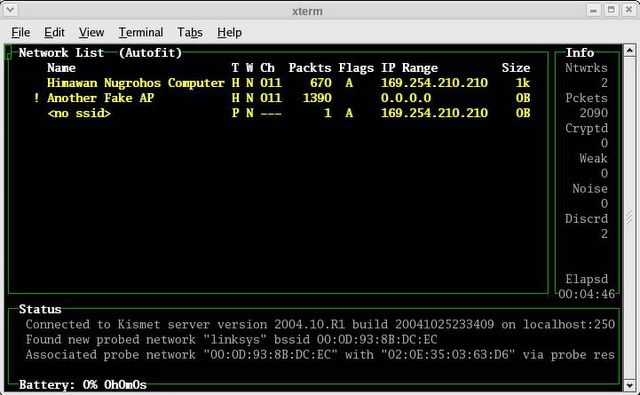
If everything’s ok, you should get the kismet panel interface just like below:


Well, it’s not difficult, isn’t it?
Just remember, every time you reboot WRT, you have to upload the kismet directory again using SCP.

Now what?
To make WRT54G running as real IDS, we have to analyze the log files in kismet server. Kismet will dump the wireless traffic its captured to Kismet-date.dump file. Then we can read the file using tcpdump –r option or ethereal. Or maybe test the traffic against snort rules?
I’ll check this later on. Now what I have in my mind is to use this router to do …
WARDRIVING!